Activate E-Mail Alias
The email alias is an additional sender email address that is available to you in addition to your rMATRIKELNUMMER@student.akbild.ac.at address. It has the format FIRSTNAME.LASTNAME@student.akbild.ac.at and can be activated in your webmail interface as follows:
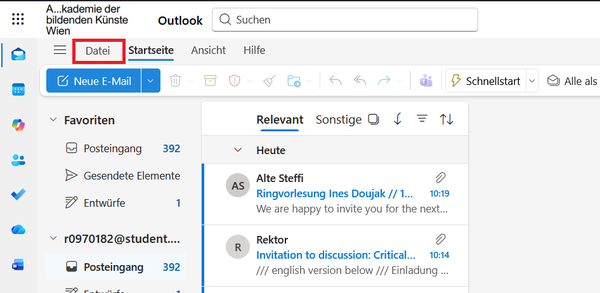
- Click on "File" in the top left corner of Webmail
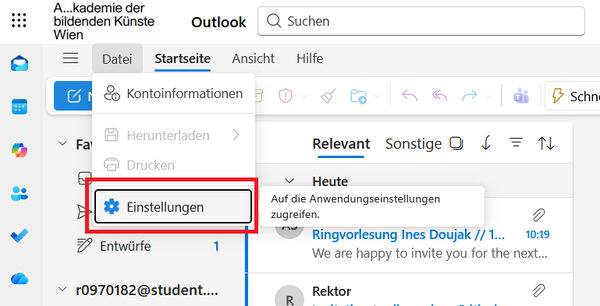
- Click on "Settings"
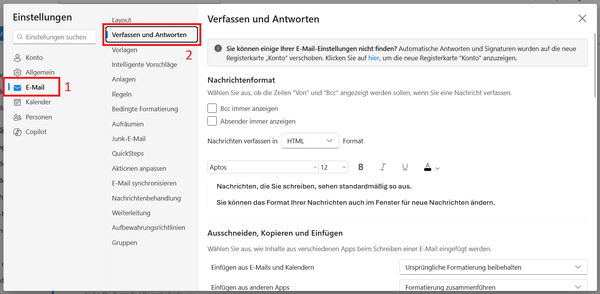
- First click the menu item "E-Mail" (1) and then "Compose and Reply" (2)
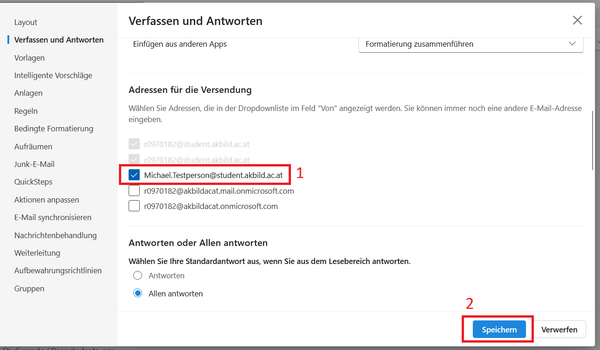
- Now check the checkbox next to the Email Alias (1) and then click "Save" (2)
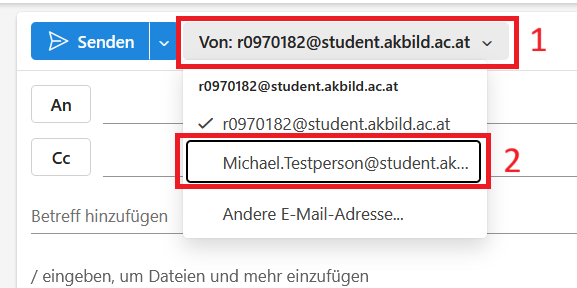
- When sending an email, you can now change the sender address in the "From:" dropdown menu located to the right of the "Send" button.
In justified cases, it is possible to apply for a preferred name as an alias instead of the officially registered name. To do so, please create a ticket by sending an email to support@akbild.ac.at. Processing usually takes up to 7 working days.